
"Hi, I'm
Glitchy $GLITCH

The simulation is fraying, and a new signal is about to tear through the Solana chain. Get ready for $GLITCH, the ultimate disruption is coming soon to pump.fun. Don't blink; you might miss the drop.
Meet Glitchy: the brightest blue koala on the blockchain with a knack for causing beautiful chaos. We aren't just another project we’re the next big glitch in the system. Grab your lime green gear, join the movement, and help us turn the entire Solana network into a playground."


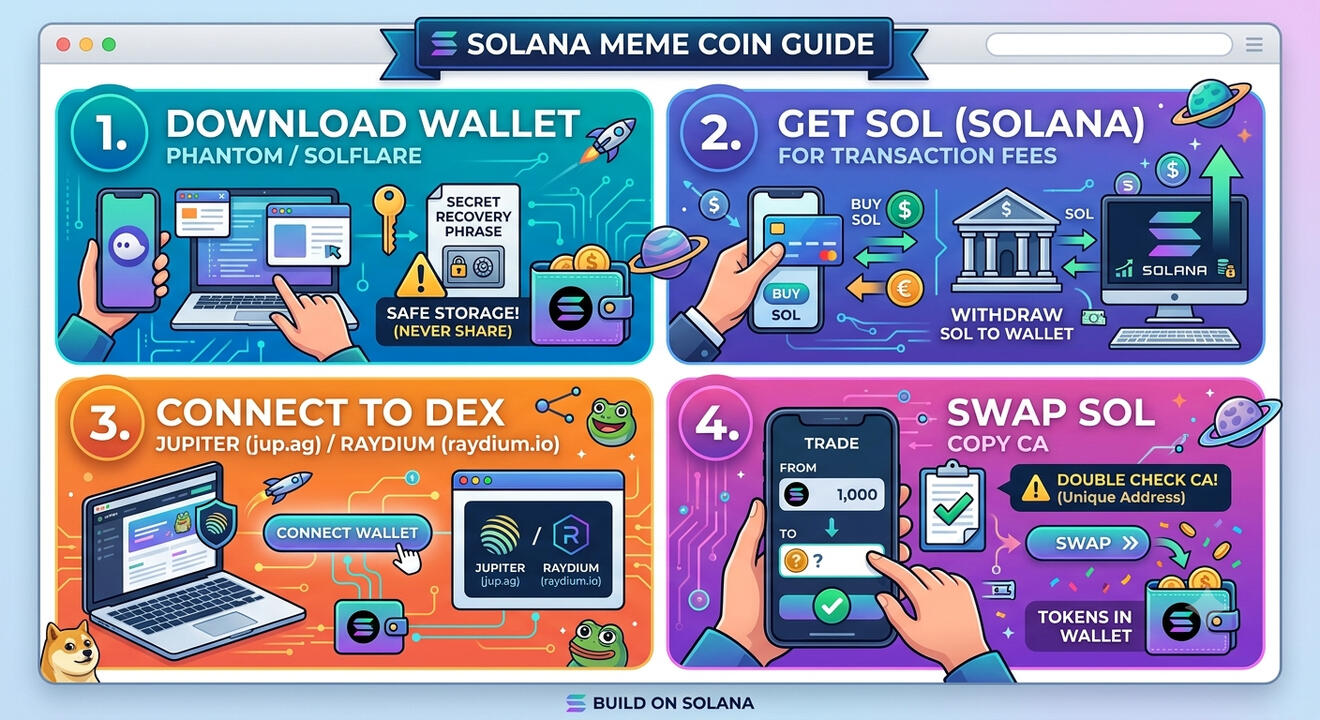
Quick guide to help you if your new to crypto!
Remember never share your seed phrase!
Always dyor, nfa# How to Buy on Solana (Quick Guide)
## 1. Download a Solana Wallet
You need a crypto wallet that connects to the Solana network.
* Download Phantom or Solflare (available as a free mobile app or desktop browser extension).
* Create a new wallet and safely store your Secret Recovery Phrase (never share this with anyone!).
## 2. Get Some SOL (Solana)
You need SOL to buy the coin and pay for the network's tiny transaction fees.
* Buy SOL directly inside your wallet app using a card/bank transfer.
* Alternative: Buy SOL on a crypto exchange (like Coinbase, Binance, or Kraken) and withdraw it to your Solana wallet address.
## 3. Connect to a Solana Exchange
* Open the built-in browser inside your wallet app (or use your desktop browser).
* Go to a trusted Solana decentralized exchange (DEX) like Jupiter (jup.ag) or Raydium (raydium.io).
* Click "Connect Wallet" and approve the connection.
## 4. Swap SOL for the Token
* Paste our official Contract Address (CA) into the "To" token selection field.
* Enter the amount of SOL you want to trade.
* Click "Swap" and confirm the transaction in your wallet.
Done! The tokens will appear in your wallet within a few seconds.
> ⚠️ Double Check the Contract Address: Always verify the Contract Address before swapping. Scam coins often copy names, but they cannot copy the unique Contract Address.